Organization Master
Purpose:
Maintain a standardized list of organizations—this can include your own legal entities (head office, branches, sister concerns) and partner organizations if you manage multiple units.
How to Create an Organization
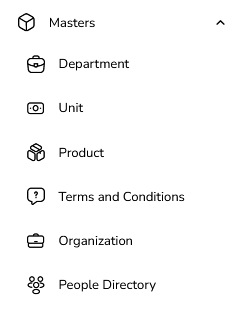
Go to Masters → Organization
Open Masters.
Click on Organization.
Click “Create Organization”
Opens organization creation form.
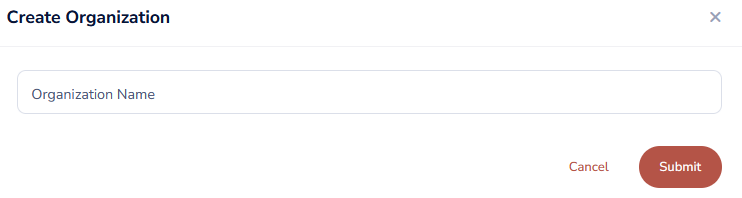
Fill in Organization Details
Organization Name (Required)
Example: “ABC Manufacturing Pvt. Ltd.”, “XYZ Group – Plant 1”.
Save
Click Save.
Organization is added to the master list.
Usage
When creating events:
Select the Organization under which the event is being created.
Edit an Organization
Open the Organization List
Go to Masters → Organization.

Find the Organization
Search via name.
Click Edit
Edit the record (address, tax IDs, contact details, logo).
Save
Click Save.
Delete an Organization
Open the Organization List
Go to Masters → Organization.

Click Delete
Click the Delete icon.
System Validation
If an organization is not linked to users or events:
Deletion is allowed.
If linked:
Deletion is blocked with a message like
“This organization is linked to events/users and cannot be deleted.”
Was this article helpful?
That’s Great!
Thank you for your feedback
Sorry! We couldn't be helpful
Thank you for your feedback
Feedback sent
We appreciate your effort and will try to fix the article