Product Master
Purpose:
Create a master catalog of all products or services your organization buys or sells.
Create a Product
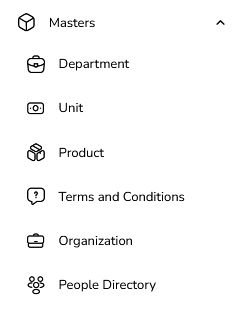
Go to Masters → Product
Open Masters .
Click on Product.
Click “Create Product”
Opens a product creation form.
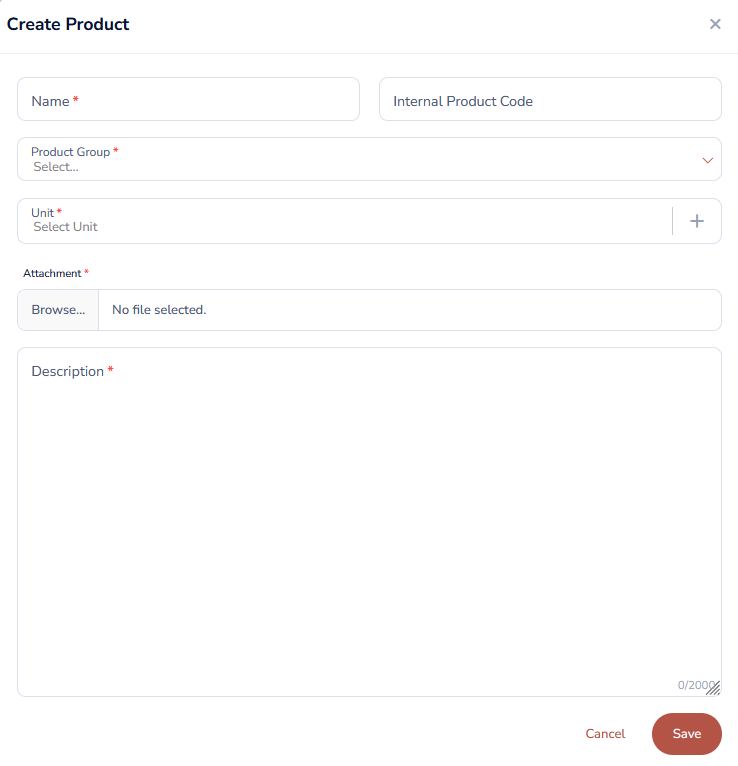
Fill in Product Details
Product Name (Required)
Example: “Executive Office Chair”, “PVC Insulated Copper Cable 2.5 sqmm”, “AMC for 500 KVA DG Set”.
Product Group (Required)
Choose from existing groups, like:
“Administration – Office Furniture”
“Administration – Printing & Stationary”
“Electrical – Cables & Wires”
Unit of Measurement (Required)
Select from your Unit master (e.g., “Nos.”, “KG”, “Ltr”).
Specifications / Description (Optional but Recommended)
Short technical or commercial description.
Save
Click Save.
Usage
While adding Line Items to RFQs or auctions.
Helps in:
Accurate reporting (by product group, by product) ,
Reusing frequently procured items.
Edit a Product
Open the Product List
Go to Masters → Product.
Search for the Product
Use filters by name, group, or code.
Click Edit
Click on the Edit icon in that row.

Update Information
Modify Product Name,, Unit, Description, or tax fields as allowed.
Save
Click Save / Update.
Delete a Product
Open the Product List
Go to Masters → Product.
Click Delete
Click the Delete icon on the row.

System Validation
If product is not used in any event:
Deletion is allowed (confirm when asked).
If product is already linked to any line items/events:
Deletion is restricted.
You will see an alert such as:
“This product is associated with existing events and cannot be deleted.”
Was this article helpful?
That’s Great!
Thank you for your feedback
Sorry! We couldn't be helpful
Thank you for your feedback
Feedback sent
We appreciate your effort and will try to fix the article