Terms & Conditions Master
Purpose:
Maintain a repository of standard legal and commercial terms (e.g., payment terms, delivery terms, warranty clauses). You can attach these to events quickly, instead of re‑typing every time.
Create Terms & Conditions
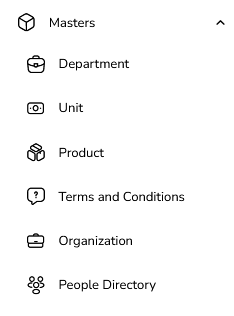
Go to Masters → Terms & Conditions
Open Masters.
Click on Terms & Conditions.
Click “Add Term & Condition”
Opens a form to define a new T&C .
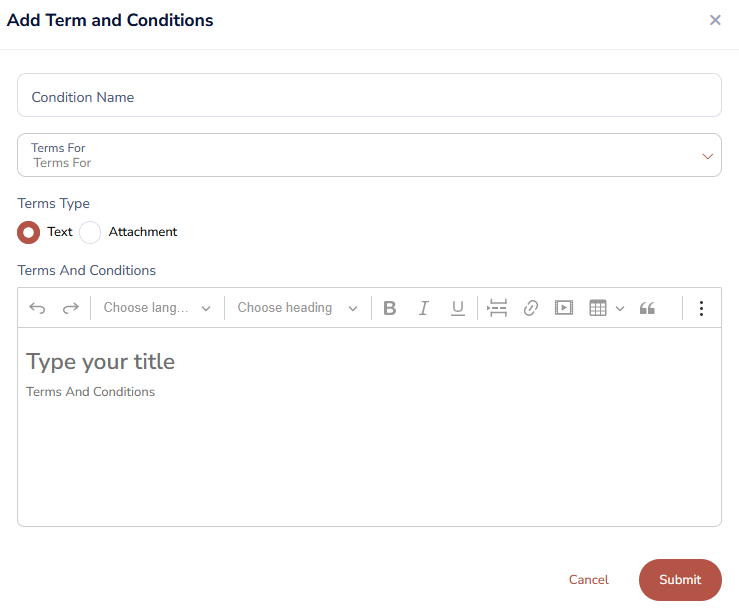
Fill in T&C Details
Condition Name (Required)
Example: “Standard Payment Terms – 30 Days”, “General Commercial Terms – RFQ”.
Term For
Example: “Common,” “Enquiry”.
Terms Type :
Text Mode
Attachment
Upload a PDF/Word document containing the full T&Cs.
Save
Click Save.
The term now appears in your T&C master for reuse.
Usage
While creating an event (RFQ / RA / FA):
Go to the Terms & Conditions tab.
Select required terms from master and add them to the event.
Edit Terms & Conditions
Open the T&C List
Go to Masters → Terms & Conditions.
Find the Term
Search by title or category.

Click Edit
Open the term in edit mode.
Update Content
Modify Title, Category, text content, dynamic variables, or uploaded file.
Ensure legal review is done before major changes.
Save
Click Save.
How to Delete Terms & Conditions
Open the T&C List
Go to Masters → Terms & Conditions.

Click Delete
Click the Delete icon on the row.
System Validation
If the term is not used in any event:
Deletion is allowed.
If the term is already attached to existing or past events:
Deletion is blocked.
A message such as:
“This term is used in events and cannot be deleted.”
is shown.
Was this article helpful?
That’s Great!
Thank you for your feedback
Sorry! We couldn't be helpful
Thank you for your feedback
Feedback sent
We appreciate your effort and will try to fix the article