Why Am I Seeing This Error?
“Invalid reCAPTCHA token or security verification required”
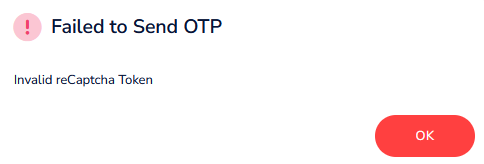
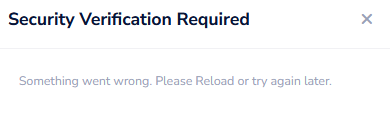
This error usually appears due to security measures triggered by repeated or suspicious login activity. Below are the most common reasons.
Common Causes
1. Too Many Login Attempts
When the system detects multiple failed login attempts from the same IP address or for the same username within a short time, it temporarily blocks further attempts as a security precaution.
2. Forgotten Password Attempts
Trying several different passwords one after another can quickly trigger the security lockout.
3. Shared Networks
If you are using public or shared Wi-Fi (such as in a café or office), another user on the same network may have already exceeded the login limit.
5. Synchronisation or CAPTCHA Issues
Sometimes the CAPTCHA fails to load or validate properly.
How to Fix this Error
1. Use a Different Browser or Incognito Mode
This helps if the issue is caused by browser data or extensions.
Action:
Try a different browser (e.g., Chrome → Firefox or Safari), or
Open an Incognito / Private browsing window.
2. Follow the “Wait 10–15 Minutes” Rule
This is the most effective solution.
Action:
Close the login page and wait at least 10 to 15 minutes before trying again.
If the issue persists even after following all steps, wait a little longer and ensure you are following the correct steps. If needed, contact support for assistance.
Was this article helpful?
That’s Great!
Thank you for your feedback
Sorry! We couldn't be helpful
Thank you for your feedback
Feedback sent
We appreciate your effort and will try to fix the article