Features of Participate Home Page:
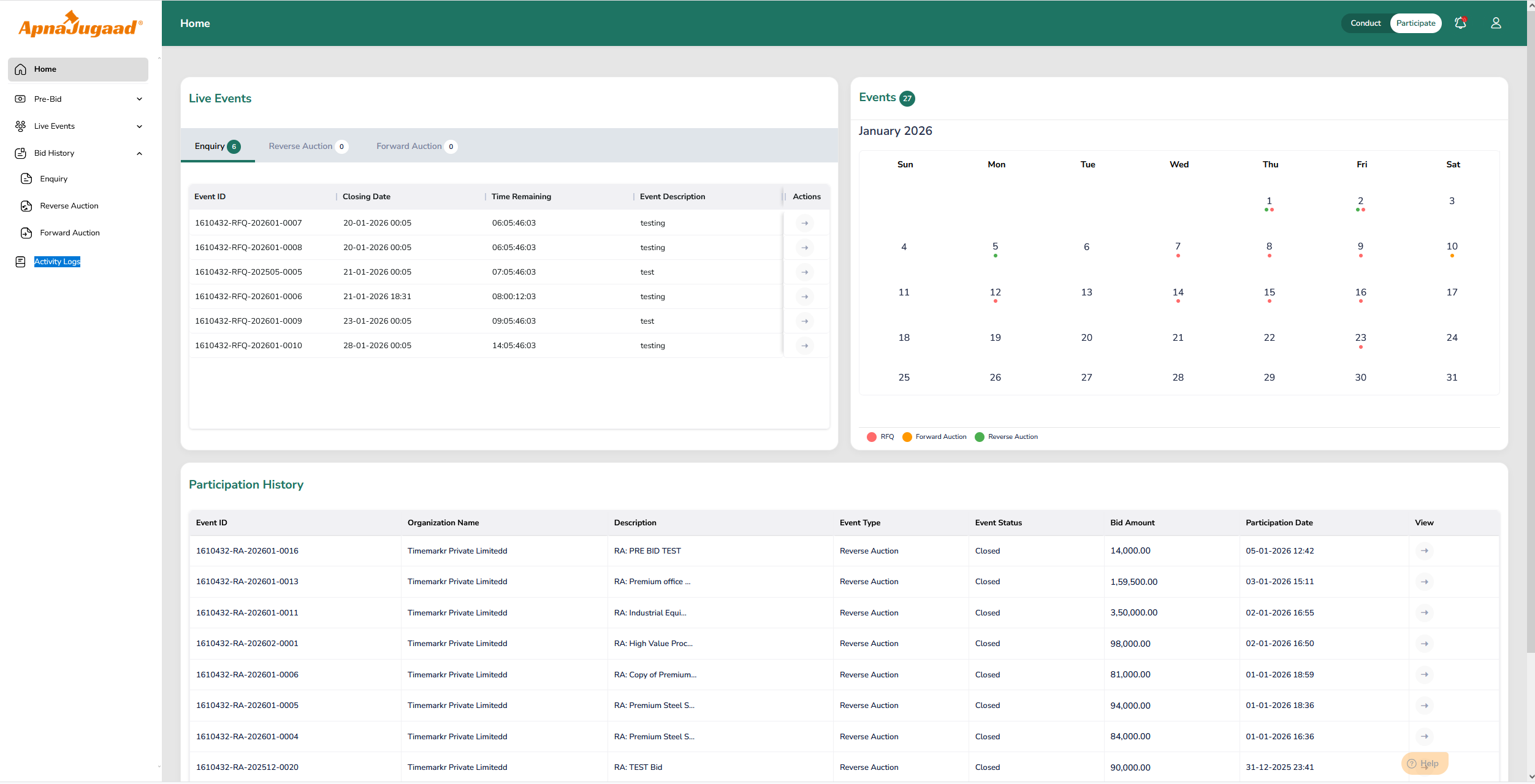
Personalized and Dashboard Summary
The dashboard displays high-level summary information through dashboard tiles or widgets. These tiles show counts for pre-bid reverse auctions, pre-bid forward auctions, live inquiries, live reverse auctions, live forward auctions, and total completed events available in Bid History, including Enquiries, reverse auctions, and forward auctions. By viewing these counts, the participant can immediately understand how many events are awaiting pre-bid submission, how many events are currently live, and how many events they have already participated in. This overview helps the user assess their workload and prioritize actions without navigating into individual menus.
Quick Navigation to Key Sections
The Participant Home page provides quick access to all major functional areas of the portal. From this screen, the participant can directly navigate to Pre-Bid Reverse Auctions, Pre-Bid Forward Auctions, Live Enquiries, Live Reverse Auctions, Live Forward Auctions, and Bid History sections for Enquiry, Reverse Auction, and Forward Auction, as well as Activity Logs. In most cases, the dashboard tiles or action buttons work as shortcuts, allowing the user to click on a tile and land directly on the related list screen. This reduces the number of clicks and avoids repeated use of the left-side menu.
Event List and Assigned Events View
Depending on system configuration, the Home page may also display a list or table of events assigned to the participant. This list typically includes upcoming events, currently live events, and recently closed events across Enquiries, Reverse Auctions, and Forward Auctions. Each event entry generally shows the event ID, event title, event type, buyer or organization name, current status, and start and end date with time. From this list, participants can open an event directly by clicking on the Event ID or title and quickly identify which events require immediate attention, such as those that are live or closing soon.
Highlights and Time-Sensitive Alerts
The Home page visually emphasizes important and time-critical events. Events that are live, starting soon, or approaching their closing time may be highlighted using colors, badges, or dedicated sections such as “Live” or “Upcoming.” These visual indicators help ensure that participants do not miss critical bidding windows, pre-bid deadlines, or enquiry submission timelines.
Notifications and Action Awareness
Although notifications are generally available through a global notification area in the header, the Home page supports this functionality by reflecting important updates through counts or indicators. For example, participants may see indications for newly received invitations or recently amended events. From the Home page, participants can quickly open the relevant event and take necessary action, creating a smooth connection between notifications and actual participation.
User and Account Context
The Home page also displays basic user context through the global header. Participants can see their logged-in name and organization or supplier company name, helping confirm that they are working in the correct account. From the same area, users can access profile-related options such as viewing or updating account details, changing their password, or logging out of the system. This ensures easy access to account management without leaving the dashboard.
Was this article helpful?
That’s Great!
Thank you for your feedback
Sorry! We couldn't be helpful
Thank you for your feedback
Feedback sent
We appreciate your effort and will try to fix the article